Chapter 4 activity

For this post we are going to show how we solved the exercises for chapter 4 using TDD. We need to add new operations like multiplying and division for the Calc.java file. The test file only has a test for the add operation as it is the only function we have in the class.

testcalc1

First of all, we need to write simple tests that describe what our new operations do. Of course, these tests should fail as we haven’t coded the functions yet.

testcalc2

Now we can start writing the functionality now, we are going to start with the subtraction as it is the first test we should pass to move to the next one. On this exercise the order we decide to write the new functions does not matter, but in more complex projects we should have a specific order to write the new functions because some tests might have multiple dependencies.

testcalc3

The next step is to write the test for the divide function. Here we have a problem, we don’t know how to implement this function because it can return a double or an integer. To follow the TDD correctly first we have to make the test pass, right now the test only ask for an integer so we will write just the code to make that correct.

testcalc4

At last, the multiply function. Here again we ask ourselves if this function should be capable of accepting float values, but it is not specified on our tests so by now we will handle only integers for the input and output.

testcalc5


Now lets imagine some guys from testing added new tests, now with more specific cases trying to find faults in our code. They included a test that divides two integers but the result is non integer, a test for a division by zero,  and a test with negative integers. After running the tests this happens:

testcalc6

As we can notice, only the division function is not passing the new tests. On one test it is expecting float numbers, on the other test, it is expecting us to catch an error when the divisor is zero. This means that we need a refactor to return doubles and to detect divisions by zero. This will change some of our previous tests, the first division test is working but it is expecting integers, the new test is expecting  doubles, there is an inconsistency in the tests and we should define this with the team first. The final decision is that a division should return doubles because it gives a more exact result. With that information we can go back to the tests, modify them accordingly and now start working on the refactor.

testcalc7

With this exercise we practiced TDD and refactoring. We learned how important it is to have good tests that defines the requirements for each function and that show how specific behavior should be handled. Also, it showed us how in TDD the tests are the guideline of our code and that it can show design errors or inconsistencies before we start writing the code, a huge advantage over other methodologies.

The code of the exercise is available here:

Calc.java

CalcTest.java

Week 4 progress

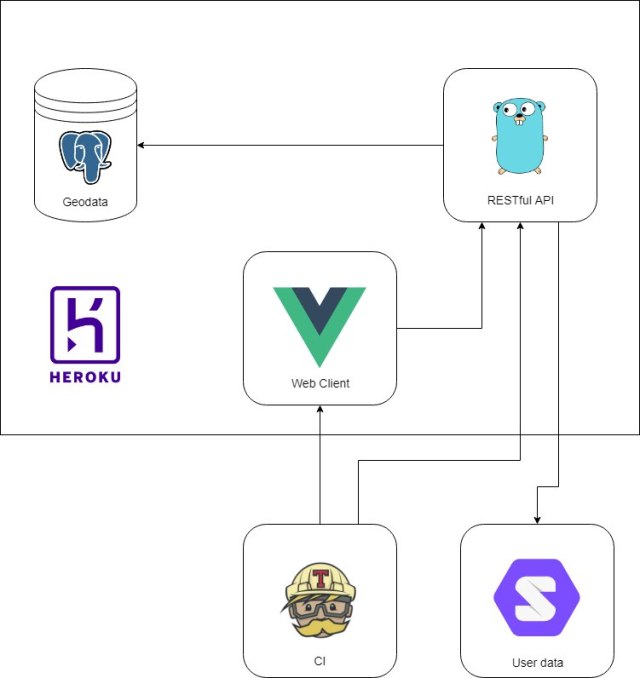
During this week we have discussed a lot about the project and the tools we are going to use from now. As we are working with a different development and we will only be doing the tests, we should work with tools that the dev team is comfortable using. The project is a web application, something that most of us have done before, but in different ways and using different tools. After talking a little bit with the other part of the team, we agreed to use VueJS instead of React for the front end, mainly because is a framework that most of use are familiar with. The database is going to be done with PostgresSQL, that already has it’s own testing framework. For the API the team decided to go with Golang and Travis for integration testing. The architecture looks like this:

architecture

The set-up is already available at the dev team repositories here:

Client – https://github.com/gdlroutes/client

API – https://github.com/gdlroutes/api/tree/develop


Chapter 3 exersises

1.- Why do testers automate tests? What are the limitation of automation?
Developers automate testing to reduce costs and reduce human error, as well as making regression testing easier by allowing a test to be run repeatedly with the press of a button.
2.- Give a one-to-two paragraph explanation for how the inheritance hierarchy can affect controllability and observability:
Inheritance can make following input and output hard, since you have to keep track of multiple class definitions to be able to get an holistic view of what is going on when the tests are running. Sometimes there will be inheritance graphs so long that it feels like going up and down like a yo-yo, this yo-yo problem term was defined in «Problems in Object-Oriented Software Reuse» by Taenzer, Ganti and Poedar.
3.-Develop JUnit tests for the BoundedQueue.class.
public class BoundedQueueTest {
    /**
     * Test of enQueue method, of class BoundedQueue.
     */
    @Test
    public void testEnQueue() {
        System.out.println("enQueue");
        Object o = 1;
        BoundedQueue instance = new BoundedQueue(5);
        instance.enQueue(o);
        
        assertEquals(instance.toString(), "[1]");
    }

    /**
     * Test of deQueue method, of class BoundedQueue.
     */
    @Test
    public void testDeQueue() {
        System.out.println("deQueue");
        Object o = 1;
        Object a = 2;
        BoundedQueue instance = new BoundedQueue(5);
        instance.enQueue(o);
        instance.enQueue(a);
        instance.deQueue();
        
        assertEquals(instance.toString(), "[2]");
    }

    /**
     * Test of isEmpty method, of class BoundedQueue.
     */
    @Test
    public void testIsEmpty() {
        System.out.println("isEmpty");

        BoundedQueue instance = new BoundedQueue(5);

        assertEquals(instance.isEmpty(), true);
    }

    /**
     * Test of isFull method, of class BoundedQueue.
     */
    @Test
    public void testIsFull() {
        System.out.println("isFull");
        Object a = 1;
        BoundedQueue instance = new BoundedQueue(5);
        instance.enQueue(a);
        instance.enQueue(a);
        instance.enQueue(a);
        instance.enQueue(a);
        instance.enQueue(a);

        assertEquals(instance.isFull(), true);
    }

    /**
     * Test of toString method, of class BoundedQueue.
     */
    @Test
    public void testToString() {
        System.out.println("toString");
        Object o = 1;
        Object a = 2;
        Object b = 4;
        BoundedQueue instance = new BoundedQueue(5);
        instance.enQueue(a);
        instance.enQueue(b);
        instance.enQueue(o);
        assertEquals(instance.toString(), "[2, 4, 1]");
    }
}
queuetest
4.-Delete the explicit throw of NullPointerException in the Min program. Verify that the JUnit test for a list with a single null element now fails.
public class MinTest {
/**
* Test of min method, of class Min.
*/
    @Test(expected = NullPointerException.class)
    public void testMin() {
        System.out.println("min");
        List list = new ArrayList();
        list.add(null);
        Object result = Min.min(list);
    }
}
mitest
6.- Using the class PrimeNumbers describe 5 tests using the methods of the class to show the next points:
a) A test that does not reach the fault
b) A test that reaches the fault but does not infect
c) A test that infects the state but does not propagate
d) A test that propagates but does not reveal
c) A test that reveals a fault
For a test where we dont reach the fault we can call the method computePrime with a parameter less or equal to 0, being «computePrime(0).

This will never allow us to enter the while where we do the current operations and where the current fault is located.
For our second test, if we call the method with a parameter for example 3, being «computePrime(3)», the program will run the part of the code where our fault is at, but since the number doesn’t end with a 9, it doesn’t infects.
For our thrid test, if we call the method with a parameter that 19, it wont add the 19 as a primer number cause of the fault in the program. But since we are not executing the toString() for our PrimeNumbers class, even if it infects, it wont propagate and the user wont realize, even if we allready have a wront value thanks to the fault.
For the fourth test, would be the same as the last case, but this time we would use the method toString() causing this to make the user realize about whats wrong in the execution (if it has some of the values to compare with the current result).
Only when the user realizes of this (by the same test result comparation) would be in the reveal stage, if not, it would stay in the propagate stage.
7.- Recode the class using the Sieve Approach, but leave the fault. What is the first false positive, and how many «primes» must a test case generate before encountering it? What does this exercise show about the RIPR model?
If you want to see the exercises’ code in our repository you can visit it here:

In Class Test


  1. Given the 4 @Test methods shown, how many times does the @Before method execute?
    Just one, it initializes global variables. In this case, we are creating objects from the class we want to test.
  2. The contract for equals() states that no exceptions may be thrown. Instead, equals() is supposed to return false if passed a null argument.
    Write a JUnit test that verifies this property for the EH class.

    @Test public void noNPE() {
           assertEquals(false, eh1.equals(null));
    }
  3. Using the given EH objects, write a test that verifies that equals() returns false if the objects are, in fact, not equal.
    @Test public void equalsFalse() {
           assertEquals(false, eh1.equals(eh2));
    }
  4. Using the given EH objects, write a test that verifies that equals() returns true if the objects are, in fact, equal.
    @Test public void equalsTrue() {
           assertEquals(true, eh1.equals(eh3));
    }
  5. Using the given EH objects, write a test to verify that hashCode() is consistent with equals. This test should fail if hashCode() is commented out (as shown), but pass if hashCode() is implemented.
    @Test public void hashConsistent() {
           assertEquals(true, eh1.hashCode() == eh3.hashCode());
    }

Planning Week 4

At the start of the semester we planned that during this week we will be setting everything up to test the project continuously in the development. The project will now be only a web application, so we need to install all the essential tools to test JavaScript code, front-end functionality and data base communication.

At the end of this week we should have everything ready in the repository and some demo tests working. This includes the Travis set-up that will allow us control pull requests automatically.

Our firsts tests

For this week our job was to learn to use the selected tools for testing. Carlos did a little bit of research for testing in Go, it’s going to be useful for the back-end. Jesus learned how to use Espresso to test android UI. Adler installed some tools from the NightmareJS for the front end and me, José, did a tutorial to install and use Junit4 for Java. Unfortunately, the project changed focus and we are not going to develop an Android app, so Java and Espresso are not going to be useful anymore. We are going to be developing only a web app. The good news is that we are already prepared with the research that Carlos and Adler did. Next week we hope to be installing and using demo tests in the repository of the project and perhaps do all the essential starting configuration.

Our code for junit is available on our GitHub here.

How to use JUnit with NetBeans

Hello to all the readers. In this post I’m going to show you how simple it is to test in Java using JUnit in NetBeans. First of all, I would like to say that this tutorial is only going to cover what we need to do to start testing simple programs for the TC3045 class in ITESM Guadalajara, that’s why we I’m going to use JUnit 4. The objective is to show how simple it is to setup the programs and start coding right away. Similar tutorials might be around the web and I’m not an expert on this subject, so if you would like to take a deeper look I recommend you going to the documentation in the official site. Everything in this tutorial is just the steps I did to have everything running in my PC(Linux). I hope you find it useful.

Step 0: Install Java

If you don’t have Java installed all you need to do is to run this commands con your console to install the JavaDevelopmentKit(JDK) in Ubuntu.

sudo add-apt-repository ppa:webupd8team/java
sudo apt install oracle-java8-installer
java -version
javac -version

Thanks to this tutorial for the help. If you are in other OS like Windows I recommend you to do the installation as any normal application, try the official java site for the JDK. Remember that sometimes you have to configure the PATH manually.

Step 1: Install NetBeans

  • Go to the official site of NetBeans and download the newest version.

1.png

As NetBeans 10 does not have an installer we must do it manually with the binary files. Download the zip file and decompress it.

2.png

3

  • Do the manual install for the bin files

For this I need you to open the terminal and go to the location of your netbeans folder. In my case I moved it to Desktop.

4

From here to do the installation insert the following commands:

sudo mv netbeans/ /opt
sudo ln -s /opt/netbeans/bin/netbeans netbeans

The first command moved the bin folder to /opt and the second command created a new command «netbeans» for the console that executes the program.

Now to open netbeans just write netbeans in your console.

5

Step 2: Create a project and write a java class

Lets star creating a new project. To avoid complications I like to create a project for the whole class and every file and exercise will be in this project.

  • Click on the «New Project» button

6

  • Select Maven and click next. We want a Java Application in Maven because it’s easier to handle dependencies.

7

  • Write the project name and choose the location. Then click «Finish».

8

Now it’s time to create a class and start coding.

  • Click on the «New File» button and create a new Java Class.

9

  • Choose the class name and click finish. I’m going to call it Operator because the class will have functions to do simple operations.

10

  • Code

Now we should have the class in out screen. I’m going to start adding simple function for sum, multiplication and a hello world.

public class Operator {
    public int sum(int a, int b){
        return a+b;
    }
    
    public int multiplication(int a, int b){
        return a*b;
    }
    
    public String helloWorld(){
        return "Hello World";
    }
}

Step 3: Create a test for that specific class

NetBeans creates automatically a testing template for the class you want, all you have to do is to modify the tests or create more.

  • Click on Tools and Create/Update Tests(You have to be on the Operator class)

11.png

**Ignore the typo in the picture 🙂

  • Deselect the options on the image(we are not going to need that), and click OK. You can change the name of the new class if you want.

12.png

Now as you can see in the new test file all the functions from Operator have a testing function. If we run the tests now it will fail because we have to remove the fail() call and modify the test.  The «assertEquals» at the end is what defines if the test passes, if the two paramenters are equal the test will pass. There are more options to create more specific tests but as I’m covering just the basics I’ll leave the code here with simple assertions that should pass.

public class OperatorTest {
    /**
     * Test of sum method, of class Operator.
     */
    @Test
    public void testSum() {
        System.out.println("sum");
        int a = 2;
        int b = 3;
        Operator instance = new Operator();
        int result = instance.sum(a, b);
        assertEquals(result, 5);
    }

    /**
     * Test of multiplication method, of class Operator.
     */
    @Test
    public void testMultiplication() {
        System.out.println("multiplication");
        int a = 5;
        int b = 3;
        Operator instance = new Operator();
        int result = instance.multiplication(a, b);
        assertEquals(result, 15);
    }

    /**
     * Test of helloWorld method, of class Operator.
     */
    @Test
    public void testHelloWorld() {
        System.out.println("helloWorld");
        Operator instance = new Operator();
        String result = instance.helloWorld();
        assertEquals(result, "Hello World");
    }
}

To run the test all you have to do is right-click on the code editor and click on «Test File» or press the buttons Ctrl+F6. The output should be something like this:

13.png

For the purpose of the class, this configurations is still not enough because NetBeans 10 uses by default JUnit5 and the book of our lecture focuses on JUnit4. The final step is to install JUnit4. Remember that I said that we are going to use Maven because is easier to handle dependencies? This is the reason, with only a few steps more everything will be ready to go.

  • Add the JUnit4 dependency.

For this you have to find the file pom.xml and open it.

14

Now inside the <dependencies> between any dependency add the next chunk of code:

<dependency>
    <groupId>junit</groupId>
    <artifactId>junit</artifactId>
    <version>4.12</version>
    <scope>test</scope>
</dependency>

15.png

Save the file and then wait for the automatic installation.

  • Change the import of the tests.

Check the imports of your test file, it’s using the library for JUnit5. All is left to do is to use the imports from JUnit4. Remove the import lines and copy paste this ones:

import static org.junit.Assert.assertEquals;
import org.junit.Test;

16

Now it’s all done!!

You are ready to go try your own classes and tests. If you want to learn useful tricks to do the activities check out this file, where you will learn to handle exceptions in testing. Remember that sometimes it is expected that the code fails, this tests are useful to test edge cases and avoid weird inputs.

If you want to see the sample code in GitHub here is the link to our project repository. It’s on a separate branch because is not related to the main testing, but it’s good to have samples somewhere in case we need them.

I hope this tutorial was helpful to you. Feel free to share this content or any content referenced here to help others as well. Keep learning and have fun.


My opinion about test && commit || revert with Kent Beck

The podcast test && commit || revert with Kent Beck shows a really good perspective about testing and let us look a little bit of Ken Beck’s mindset. It’s really interesting that Scott Hanselman proposes a way of looking at a software project as something to be feared and that coding should be around avoiding failures, but Kent Beck has another mentality, he thinks that DevOps and testing is about reducing fear and generating confidence. I like that he was able to look at the positive side of this huge problem programmers have, that is avoiding making changes to the code because of fear of breaking it. It’s really important for programmers to have confidence in making changes, writing new code or adding new features because it’s what makes us feel productive. Of course, seeing it all break and not being able to find the problem sucks, but the point of testing is to avoid these things from happening while allowing people to make changes.

Another common topic they discussed is TCR or test && commit || revert, a methodology that consists on reverting all of the commit if the tests fails, only allowing green code to pass the commit. This is a problem for a lot of software engineers because we are used to commit code that represents a complete function or feature, this methodology suggest that we only upload code that works and that forces the programmer to do very little changes that should work, otherwise it will be dumped and nobody wants to risk hours of their work. Thats why with TCR is better to commit changes every minute or so. The whole point of this is to keep the tests on green and increase confidence in the team. I like that he figured this way of working by trying stuff that he did not like, it sounds unintuitive at first but after trying it in a small project he learned the benefits of TCR. Some people correlate TDD(Test Driven Development) with TCR, and I see the point, both are methodologies that forces the programmer to create tests first and then run the tests several times while modifying the code until all tests passes. However, TCR is a more drastic approach that pushes and encourages more than anything else that the code is always working and test is always green. This is of course still an experiment, perhaps it’s really hard to implement this methodology in a larger team or bigger projects because people need a complete change of mentality and habits. We still have to find out if it is really worth it to change the way we work with code, but for that we need to try it by ourselves. TCR sounds painful, but after some repetition, we might form ourselves the habit of committing small pieces or redoing our work if it resulted as a failure. I think that we all should be like Kent Beck in the sense of experimenting new stuff for the sake of learning how to do something better, even-though this seems counter productive.

Planning week 3

This week we are going to do a little bit more of research on the selected frameworks and tools we decide, as we stated on the semester plan. For this project we decided that we are going to use mostly Java for Android, SOLID for the database and Go for the back-end. Each one of us is going to learn through tutorials and guides a specific tool for testing and at the end of the week we are going to write down the conclusions in another post. For this week the assignments are:

Carlos Alberto Rueda: Do research of a Go testing tool, pick one and learn to use it.

Jesus Alberto Alvarez: Learn to use Espresso for testing Android UI.

José Carlos Peñuelas: Learn to use JUnit for automated Java tests.

Adler Zamora: Learn to install and use NightmareJS for several front-end tests.

It’s important to say that this doesn’t mean that this is not what each one if use is going to work on the whole semester. We just want to learn a little bit about setting up the tools and add them to our project from the beginning in case that we need them. Some things might(will) change or some tools are not going to be needed. Also, we should be able to explain how to explain the usage of a testing tool to our partners so that they can write tests too. The point of this is that whenever we need more work on one part of the project we could help others to test on any framework we use.

Project description

The project we are going to be working this semester is about smart cities. The objective is to build a platform that collect data around a specific city using tools like ArcGIS and ReactJS. The platform will also create tours of the city using the data and analysis and then guide the user trough the city using the GPS localization of the user’s phone. We need to be able to create, update and delete walk registers of the users and for that we may need a database to save all those registers, we are not sure if that is a requirement for the project but we will take it into consideration for the research that will be described in the next paragraph.

Mostly the languages that we are going to be working with are JavaScript and Java and some tools are the already mentioned ReactJS, ArcGIS and probably NodeJS. We are still not sure if we will need an SQL or no-SQL database but it would be good to know frameworks or tools for integration testing. With that information our team looked for some testing frameworks that will allow us to make testing easier for us in every aspect of the development:

Espresso:
Espresso is a powerful tool for testing purposes for android. Made by google it allows for testing of android applications by simulating app interaction in your test cases. It even allows to test interactions between your app and others. By using assertions and telling espresso where to click and what to input it allows app flow testing and general responses.

JUnit:
For unit testing, as android is mainly done with Java, JUnit should be the go to tool for being able to test the code and have easy test automation. It is easy to implement and helps to develop by TDD.

Mocha:
Mocha is a feature-rich JavaScript test framework running on Node.js and in the browser, making asynchronous testing simple and fun. Mocha tests run serially, allowing for flexible and accurate reporting, while mapping uncaught exceptions to the correct test cases.

Since we will be using ReactJS for our project as the frontEnd framework, we need to really take in consideration the different tools we could integrate and use for its proper end-to-end testing. The ideal scheme is for users to constantly be using our system, so the most we focus on developing a high quality software, the best product will give to our customers.
We did a research and found out that we could start with diferent tools depending on the most accurate aproach.

NightmareJS:
NightmareJS is a high-level automation library wich has:
Niffy which detect UI changes and bus across releases of your web app, Daydream which is a chrome extension to record your actions into a puppeter script & Electron which helps you generate a cross-platform desktop app using html, css, js.

Enzyme:
Enzyme is a tool that goes great with Mocha. It is a JS testing utility for React that makes it easier to assert, manipulate and traverse a React Components’ output. It is said to be easy to learn (both Mocha and Enzyme) even for new users in a short period of time.

Protactor:
In class we talked about the goals on testing and mentioned Verification and Validation. Well, there is this tool called Protactor, which is for acceptance testing which means that a system is being tested to evaluate the compliance with the business requirements (or the validation stage). The bad thing about it is that it was originally designed for Angular, although it is possible to configure it to work with React. It also helps you testing your app against a wide variety of software.

Mongo-Orchestation:
We are still not sure what kind of database we are going to use for the project, but if we had to guess, we are probably going to need a no-SQL database because the data we will manipulate may be big or unstructured.  MongoDB is a database program that is based on documents, it is said that it’s easy to use and to set up in almost any project. To do testing easily in a MongoDB database there is Mongo Orchestation. Mongo Orchestration (MO) is an HTTP server providing a RESTful interface to MongoDB process management running on the same machine. This will help us to automate test for simple requests using mocked server responses.